Blog
Withdrawal button for online shops - what applies from June 2026
Katharina Theo Rösner


The checkout process is usually super easy thanks to the buy button. From now on, cancellations should be just as easy. We’ll give you an overview of the new legislation.
Starting June 19, 2026, all online shops must provide a cancellation button of a purchase clearly visible via a cancellation button to make it possible.
The reason for this is to make cancelling just as easy as making a purchase. The cancellation button is intended to strengthen consumer protection. After all, consumers can make a purchase with just one click, whereas cancelling via email or a contact form buried somewhere in the website footer is often difficult. This complicated search process is now to be eliminated, as this lack of transparency is frequently criticized. Therefore, it was recently established that the cancellation process must be just as simple as the purchase process.
The statutory cancellation period of 14 days applies according to Section 355 (2) of the German Civil Code (BGB) for online purchases and purchases made by phone or off-premises. If customers are not informed about their right of withdrawal, the period is extended by one year. Companies can also choose to offer a longer period than is legally required. For the cancellation policy there are template texts that you can obtain from the Chamber of Commerce and Industry (IHK), for example. The cancellation policy must be provided before and after the conclusion of the sales contract. The terms and conditions do not replace the cancellation policy. You can read more about cancellations at the ECC.
The period begins as soon as the goods have been delivered. If the order contains multiple items, the cancellation period begins after the delivery of the last item. For magazine subscriptions, however, it begins on the first day of delivery. For an exchange you need a reason. A cancellation occurs if the order has been placed but the goods have not yet been shipped. This means that the withdrawal may only take place after receipt of the goods.
Unlike an exchange, you do not need to provide a reason for a withdrawal. Previously, cancellations were possible via email, phone, or a form. From June 19, 2026, this will be possible via a button. You can find out more about this at Tagesschau.
The goods are then simply returned. The company must refund standard shipping costs, but is not automatically responsible for return shipping costs.
No. There are goods that are excluded from withdrawal. These include, for example, perishable food, opened hygiene products, medication, or tickets. Fresh and unpackaged food items also do not require a withdrawal button and are excluded from the right of withdrawal.
The goods may be tried out and checked for damage. If a customer damages the products themselves after receiving them, the seller may claim compensation for the loss in value.
Services are also covered by the right of withdrawal. However, the 14-day period can end early if, for example, the service was started only after the contract was concluded. If the service has been provided in full or in part, the company can claim compensation for loss in value. For digital services, too, the right of withdrawal can expire prematurely.
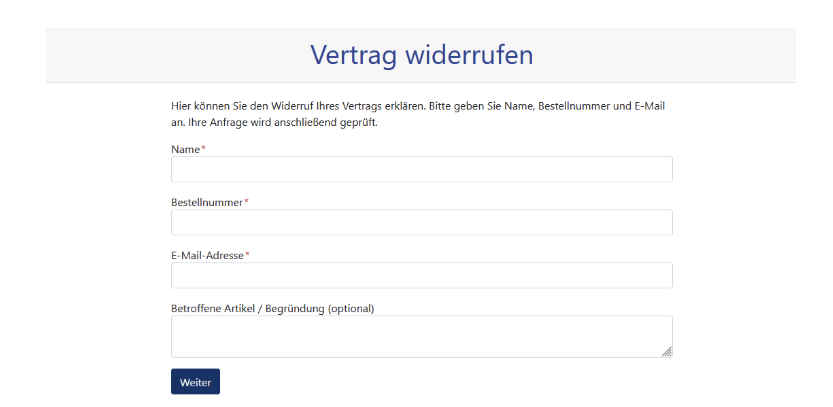
Effective immediately, every website or online shop must have such a withdrawal button in place be. The click should lead to a form where the order number, name , and email address are entered so that the order can be identified. The data is then confirmed, and the customer should then receive a confirmation of the cancellation via email. However, this confirmation is to be viewed separately from the execution of the cancellation and must also be confirmed separately. The key here is also transparent and complete documentation.
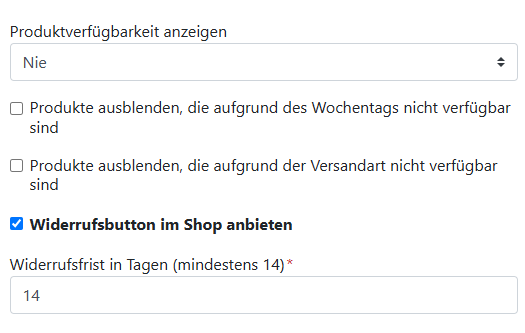
The cancellation button can now be added to any webshop. To set it up with FrachtPilot, you don't need to do anything other than go to the admin overview and click on company profile, then go to settings and click on webshop . From there, scroll down to product availability and check the box for 'Offer a cancellation button in the shop. This makes it easy for your customers to cancel orders. They will then receive a confirmation of the cancellation via email. The delivery service or webshop provider receives a notification of the customer's cancellation so that the cancellation can be reviewed order can then be processed accordingly, meaning cancelled.
Navigation path to the settings:
Company Profile > Settings > Webshop
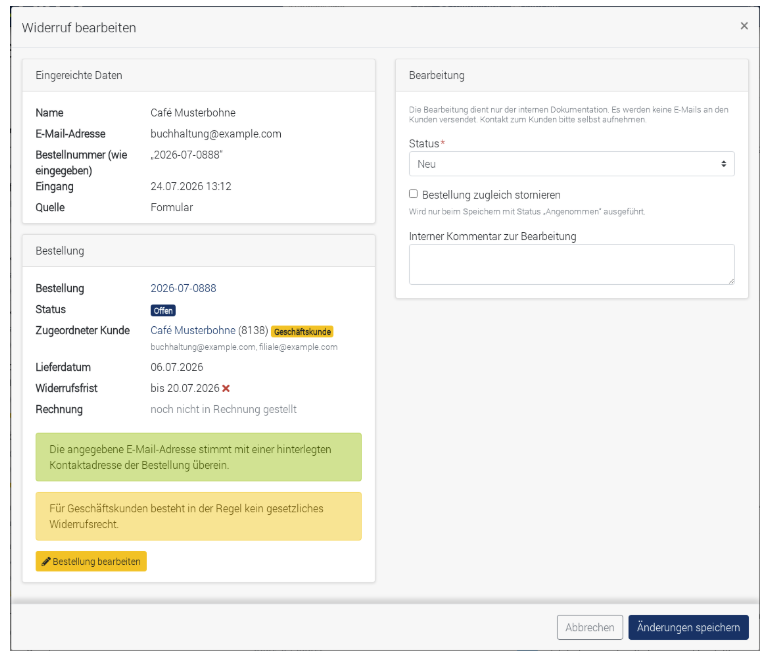
In the FrachtPilot cockpit you can find in the customer activity data now also the received cancellations. Processing is handled internally, which means your customers are not automatically notified when you accept the cancellation. You should handle this through your standard customer communication channels.
The field displays the submitted customer or order data. The system attempts to assign them automatically, though this is not always possible, for example, if no customer account exists. In that case, you must perform the assignment manually. To do this, change the status from new to accepted or rejected. If accepted, you can also, by checking the box, cancelled the order directly be.
It will also show you whether the cancellation was received within the deadline or not. Whether your customers are entitled to a cancellation after the deadline has passed is your decision. You can find further information and instructions in the FrachtPilot Help Center
Some goods are excluded from the right of withdrawal. You also need a cancellation button in your online shop for packaged food in regional direct food marketing. Your FrachtPilot team has already taken care of this.
If you are still looking for the right ERP software for your business, then take a look at our website, book a free webinar or test FrachtPilot for 30 days for free. We look forward to hearing from you!