Blog
Filter options in FrachtPilot for an optimal overview of your data
Katharina Theo Rösner


In FrachtPilot you can use filters, for example, to evaluate data or to find outstanding invoices. We'll give you an overview of what customer, product and other filters can do for you in your daily work with FrachtPilot.
Before orders can be billed collectively, they must be completed. To do this, filter out the open ones first. This is common practice among regular customers. The filters that are used are the status and the delivery date.
In order to see at a glance which invoices have been paid, partially paid or issued, or whether a repayment is pending, you can also use the regular invoice or cancellation invoice filter.
Note: Filters are unique and must be updated - for example, the individual days or delivery periods.
Customer filters can be used for various use cases.
---------
First, customer filters must be configured in settings in order to be able to use them, as well. You do that in the management overview under the rider Miscellaneous > Customer filter.
If you want to select customers without an order in a specific delivery period, enter the from-to data and the option to filter out customers without an order. If you now want to know which regular customers this applies to, you also create another customer filter with the selection 'regular' for the customer group. You can combine this with the basic filter using the filter operation. If both filters are to apply, the filter operation must be Intersection.
The filter operations are intersection, complement, agreement, union, and difference. As a result of these operations, filters are combined. You can find more information in our help.

For your online shop search filters are essential because they are super practical for your customers to search for a specific product. They will created automatically based on your products. But you can also add additional Webshop categories create in the product master data. Possible filters include the brand (manufacturer/producer), type, type of container and container size.
In the Management overview You can find under the tab miscellaneous the option Product filter, the one there with the button Create a new product filter can be created. To do this, you have to Filter name enter and then give it Assigning products.
This could be milk with products such as whole milk, lactose-free milk and cocoa, or various containers.
In the evaluation it can be filtered by customer group, product group, who brand, the dispatch date and the type of product. Product filters provide information about the product turnover.
The data is grouped beforehand. This can be helpful if you want to know, for example, which product group was ordered the most or least by a customer or a business or private customer. To do this, you also define the one to be taken into account for the evaluation period, which can be days, calendar weeks, months or even the whole year.
In the rider paragraph you can also see how much empties you have withdrawn. This is relevant because you have boxes or other deposit container reuse and deliver again. If you return more than you get back, you need more containers, which may be left over when you get some deposit containers back after all. You can then remind your customers by email to return empties.
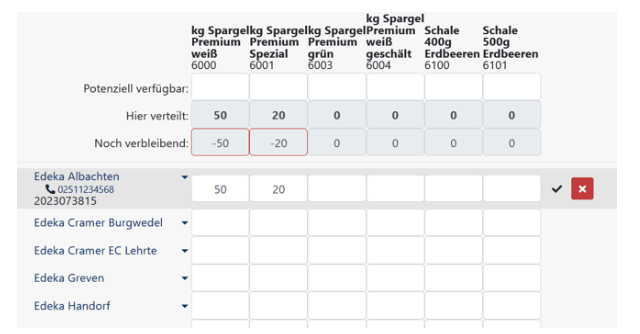
Product filters are also necessary to be able to use batch order: You set which products are to be delivered. In FrachtPilot, batch orders look like customers in the lines and in the column one or even several products, many of which various customers order at once on a delivery day.
FrachtPilot offers you many options to filter data for, for example, an optimal evaluation. The filters must be configured first so that they can also be combined. Once set up correctly, filters save you a lot of time - just like others functions by FrachtPilot. If you're still looking for a suitable ERP software, have a look at FrachtPilot, book a free webinar to get to know us and the ERP system, or test FrachtPilot directly for free. We're looking forward to seeing you!